
Call us now :08045800780
 Send Inquiry
 Send Inquiry
WiiM Mini
Price 14999 INR/ Piece
MOQ : 1 Piece
WiiM Mini Specification
- Connectivity Type
- Wi-Fi 2.4/5GHz, Bluetooth, Aux Out, Optical Out
- Sensor Type
- No Onboard Sensors
- Technology
- Wi-Fi, Bluetooth 5.0, AirPlay 2, Spotify Connect, DLNA
- Special Features
- Multiroom Streaming, Hi-Res Audio, App & Voice Control, Compact Design
- Remote Control
- Mobile App Control (WiiM Home, Alexa App)
- Application
- Wireless Audio Streaming, Home Audio Integration
- Power Supply
- 5V 1A (Micro USB)
- Output Formats
- Analog (3.5mm), Digital (Mini TOSLINK Optical)
- File Compatibility
- MP3, AAC, ALAC, APE, FLAC, WAV, WMA, OGG
- Firmware Upgrade
- Over the Air (OTA) via App
- Dimensions
- 69mm x 69mm x 24mm
- Operating Temperature
- 0°C to 40°C
- Multiroom Support
- Yes
- Supported Music Services
- Spotify, Amazon Music, Tidal, Deezer, Qobuz, iHeartRadio, TuneIn, and more
- Audio Output
- 24-bit/192kHz Hi-Res Supported
- Voice Assistant Support
- Alexa, Siri (via AirPlay 2), Google Assistant
- Weight
- 40g
- System Compatibility
- iOS, Android, Windows, MacOS
- EQ Controls
- 10-band Graphic EQ in App
- Audio Formats
- PCM up to 24-bit/192kHz via Optical Out
- Network Protocols
- UPnP, DLNA, AirPlay 2
About WiiM Mini
It supports up to 192 khz, 24bit audio output that's the same as the artists recoding in the studio. The integrated TI stereo DAC provides the high quality analog audio output with the 106dB SNR, dynamic range and 92dB THD plus N performance. It Support many top music streaming services in our companion app and through AVS like Spotify, iHeartRadio, Tidal, Amazon Prime Music, Napster, Deezer, & more to come.Hi-Res Audio Streaming in a Compact Form
WiiM Mini offers precise and immersive audio output, supporting up to 24-bit/192kHz resolution via optical out. Its lightweight and small footprint make it ideal for discrete placement in your home, while maintaining exceptional sound quality. Integration is seamless, whether you're connecting with a personal stereo or a multiroom system.
Effortless Multiroom Control and Compatibility
Designed for modern smart homes, the WiiM Mini supports multiroom audio setups with app or voice control. You can use Alexa, Siri (via AirPlay 2), or Google Assistant to manage playback in different rooms. The unit communicates with popular network protocols for reliable wireless streaming across a wide range of devices.
Comprehensive Streaming and Connectivity Options
Access an array of music services-Spotify, Amazon Music, Tidal, Qobuz, and more-directly through the WiiM Home app. With both analog and digital outputs, broad file compatibility, and Wi-Fi/Bluetooth/Aux/Optical connectivity, the WiiM Mini adapts fluidly to varied home audio configurations and preferences.
FAQ's of WiiM Mini:
Q: How do I set up the WiiM Mini for wireless audio streaming in my home?
A: Setup is straightforward: connect the WiiM Mini to your home Wi-Fi or Bluetooth network, plug it into your audio system via analog (3.5mm) or optical output, and use the WiiM Home app to complete setup and access streaming services and multiroom controls.Q: What are the benefits of using the WiiM Mini for high-resolution audio playback?
A: WiiM Mini supports PCM audio output up to 24-bit/192kHz via optical out, delivering crisp, detailed sound. This ensures you enjoy superior audio quality from supported streaming platforms and local high-res files on compatible devices.Q: Which devices and operating systems are compatible with the WiiM Mini?
A: The WiiM Mini works with iOS, Android, Windows, and MacOS devices. It also connects to voice assistants such as Alexa, Siri (AirPlay 2), and Google Assistant, ensuring compatibility with most smartphones, tablets, and computers.Q: When can I perform firmware upgrades for my WiiM Mini?
A: Firmware upgrades are delivered Over the Air (OTA) via the WiiM Home app. You can update your device whenever new enhancements or features are released to maintain optimal performance and benefit from the latest improvements.Q: Where can I use the WiiM Mini in my home audio setup?
A: WiiM Mini can be placed anywhere within Wi-Fi or Bluetooth range. Its compact design fits easily on shelves, desks, or behind audio equipment, making it suitable for living rooms, bedrooms, kitchens, or any area where you want wireless audio streaming.Q: What is the process for integrating the WiiM Mini with multiroom audio systems?
A: Using the WiiM Home app and compatible network protocols (UPnP, DLNA, AirPlay 2), you can link multiple WiiM Mini units or supported devices for synchronized multiroom playback, managing audio zones individually or collectively with simple controls.Q: How can I control playback and EQ settings on the WiiM Mini?
A: Playback and EQ controls are accessible through the WiiM Home or Alexa app. Users can adjust the 10-band graphic EQ, choose output formats, and switch between music services, ensuring tailored audio performance to suit personal preferences.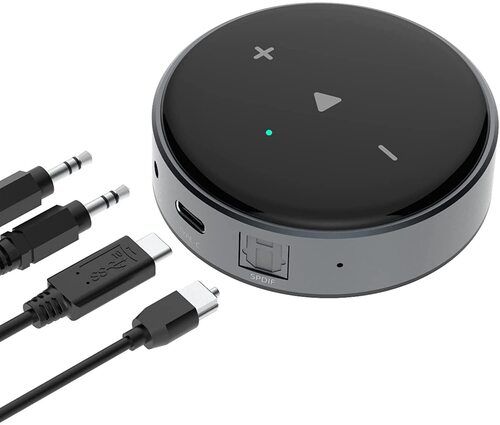
Tell us about your requirement

Price:
Quantity
Select Unit
- 50
- 100
- 200
- 250
- 500
- 1000+
Additional detail
Mobile number
Email

More Products in Smart Home Category

Epson EF-11 Epson Projector
Price 101999 INR / Piece
Minimum Order Quantity : 1 Piece
Application : Other, Home Theater, Office, Education, Entertainment, Portable Presentations
Screen Resolution : Full HD 1920 x 1080 pixels
Image/Video Quality : Full HD, High Contrast 2,500,000:1, Color and White Brightness: 1000 lumens
Technology : Other, 3LCD Projection, Laser Light Source
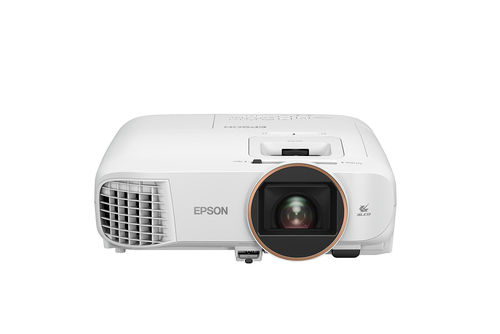
Epson EH-TW5820
Price 127000 INR / Piece
Minimum Order Quantity : 1 Piece
Application : Other, Home Cinema, Movies, Gaming
Screen Resolution : 1920 x 1080 (Full HD)
Image/Video Quality : Full HD, High Contrast, Colour Brightness 2,700 lm
Technology : Other, 3LCD Projection Technology
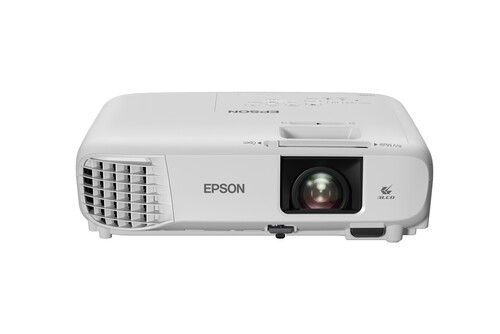
Epson EH-TW740
Price 74999 INR / Piece
Minimum Order Quantity : 1 Piece
Application : Other, Home Cinema, Office Presentation, Classroom Display
Screen Resolution : Full HD 19201080 pixels
Image/Video Quality : Supports Full HD 1080p, 16,000:1 Contrast Ratio
Technology : Other, 3LCD Projection
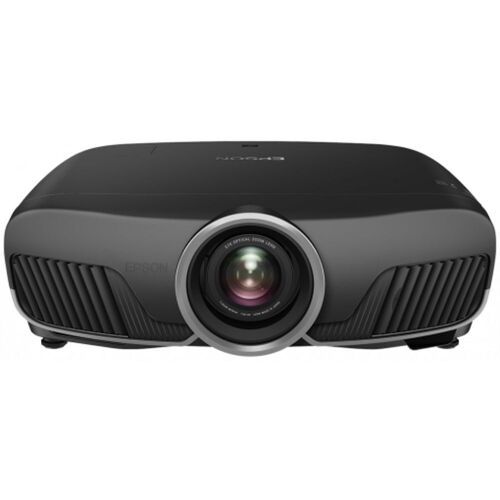
Epson EH-TW9400
Price 278000 INR / Piece
Minimum Order Quantity : 1 Piece
Application : Other, Home Theater, Cinema, Media Rooms
Screen Resolution : Up to 4096 x 2160 (4K Enhancement)
Image/Video Quality : Ultra High Definition, HDR10/HLG, 1,200,000:1 Dynamic Contrast, up to 2,600 lumens Brightness
Technology : Other, 3LCD Projection, 4K Enhancement, 3x Higher Color Brightness

 Send Inquiry
Our Products

Plot No-9, Khasra No-300, Sultanpur, Near Metro Sultanpur,New Delhi - 110030, India

Mrs Deepti Oberoi
(Customer Relationship manager)
Mobile :08045800780
 Send Inquiry
 Send SMS
Developed and Managed by Infocom Network Private Limited.
